
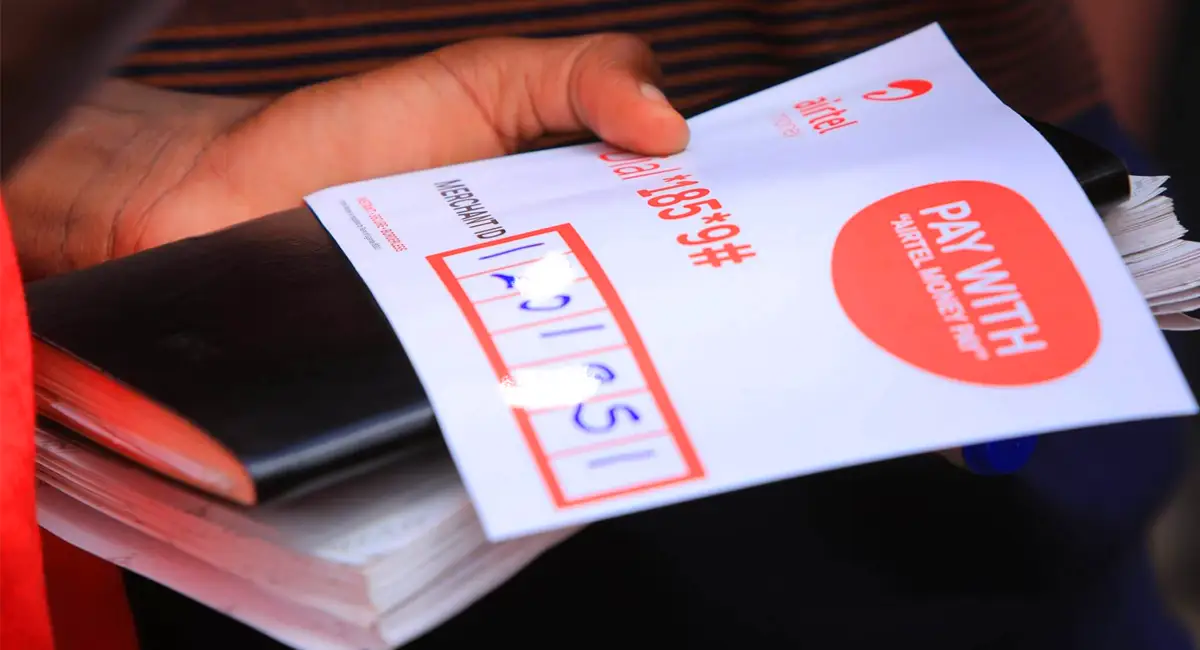
Who isn’t using merchant payment codes these days? From local retail shops to upscale boutiques, churches, mosques, NGOs and even politicians, people are adopting merchant codes to collect mobile money payments.
Why? Among many, it’s a simple way to receive payments without reading out your phone number, eleeta manya ki?
Whether you’re registering as a Micro or Formal merchant, this guide walks you through getting and activating an Airtel Money Pay merchant code, also known as a Merchant ID, AM Pay or a till number. I’ve also included a few features you might not know about.
#1. How to get an Airtel Money Pay Merchant Code (Micro Merchant)
The Micro/informal merchants are probably the most advertised. Because this option is open to every subscriber with an active Airtel line, you can create your informal Airtel Money Pay merchant code in under 5 minutes without visiting an Airtel service centre
Dial *185*10*10# on your Airtel Uganda line
Enter your business name. (Max 20 characters)
Enter 1 to accept the terms and conditions
Enter your Airtel Money PIN to confirm the registration.
Shortly, you’ll receive an SMS in your Airtel Money message thread with your 7-digit merchant code.
That’s it! Your Airtel Money Pay is ready to use.
Need the Airtel Money Pay display printouts? Contact Airtel customer support or visit a service centre.
How To Access Your Airtel Money Pay Account
Once your activation is confirmed, you can manage your Airtel Money Pay account through the Airtel Money USSD menu or the Airtel app.
Through *185#
Dial *185#, and you’ll see a new option:
11. Biz Wallet
Select option 11 (Biz Wallet) to access options:
1. Withdraw Cash
2. Payments
3. Biz Account
Through the Airtel App
Open the Airtel App and select the Airtel Money section from the bottom menu. To the right of your Airtel Money balance, you’ll see a new widget to manage your Airtel Money Pay. Here, just like the USSD menu, you can check your balance, withdraw cash, or make payments.
How Much Money Can an Informal Airtel Money Pay Hold?
An informal merchant has a single-transaction limit of UGX 5 million, while the maximum balance is UGX 20 million.
These limits apply to your business and personal Airtel Money wallets combined. For example, if your Airtel Money Pay account already holds UGX 20 million, your personal Airtel Money wallet cannot receive more money until the balance falls below the limit.
Despite these limits, an informal merchant code is incredibly handy for keeping your business and personal money separate. Great for small businesses like food vendors, rolex, salons, retail shops and boda bodas.
Are Airtel Money Pay Merchant safe?
Yes. Just like your standard Airtel Money wallet, keeping your merchant account secure starts with protecting your 4-digit Airtel Money PIN.
Interestingly, if your business has several branches, you can add up to 4 additional till IDs under your main merchant ID, which acts as the parent till. Each branch gets its own child Merchant ID to receive and confirm customer payments, but cannot cash out or make payments; only the parent till holds that authority.
How To Add a Branch Till
From the parent merchant line:
Dial *185*11#
Select 3 (Biz Account)
Select 3 (Till Manager)
Select 1 (New Till)
Follow the prompts to add the branch number.
The number (MSISDN) you add must be registered in the same name as the parent merchant account and have a zero balance. Once added, it receives its own Merchant ID.
How To Pull Money from a Branch Till
Only the parent till can pull funds from its branch till:
Dial *185*11#
Select 1
Select 3 (Pull Funds from Tills)
Follow the prompts.
#2. How to Get an Airtel Money Pay Merchant Code (Formal Merchant)
Unlike a Micro merchant, a Formal Airtel Money merchant account is designed for fully registered businesses and organisations such as large companies, NGOs, and mega-churches that collect substantial volumes of money.
Getting a Formal Airtel Money Pay merchant code is more involved than registering as a Micro merchant. You may need to visit an Airtel service centre or submit the required documents through an Airtel agent.
Documents Required for a Formal Airtel Money Pay
You may be asked to provide a copy of the:
Certificate of Incorporation or Registration
Memorandum and Articles of Association, Partnership Deed, Constitution or equivalent
Statement of Particulars of Directors (Form 20/7)
Company Form 18 or LC letter
Valid Trading Licence or equivalent
Directors’ National IDs for Ugandans or passports for foreigners
TIN Certificate.
With all required documents, the merchant code can be issued within a day.
A Formal merchant account is managed separately from your personal Airtel number, with its own merchant number starting with 0709… and registered under a business or company name, to which the merchant ID is assigned.
A formal merchant account allows for a significantly larger maximum balance. While you can make payments and send money to another merchant directly, withdrawing funds requires a business bank account.
When managing child/branch merchant lines, a Formal merchant can add as many sub-merchant lines as possible.