

Hearing that Google Chrome had rolled out vertical tabs took me back to 2016. Whenever I walked into an internet café, I always chose machines that had Opera installed because of how polished the browser felt. One feature I still remember was the sidebar for messaging apps; not exactly for tabs, but it gave a then-futuristic experience compared to the basic layouts of many other browsers at the time.
And finally, Chrome browser, which has long been my default, rolled out vertical tabs on 07 April 2026. Here’s how to enable the feature.
How To Enable Vertical Tabs in Chrome Browser
Open Chrome and enter: chrome://flags
On the Experiment page, enter and search Vertical Tabs in the search flags bar
On the rectangular Default button on the right, click and select Enable
Relaunch your Chrome Browser
After Chrome restart, go to the ⁝ menus icon, then > More Tools > Show Tabs Vertically.
How To Disable Vertical Tabs in Chrome
If the feature does not work for you, or you simply prefer the classic layout, switching back is easy.
Option-click anywhere on the vertical tab section and select Show tabs horizontally.
You can also return to chrome://flags, search Vertical Tabs, and set it back to Default or Disabled, then relaunch the browser.
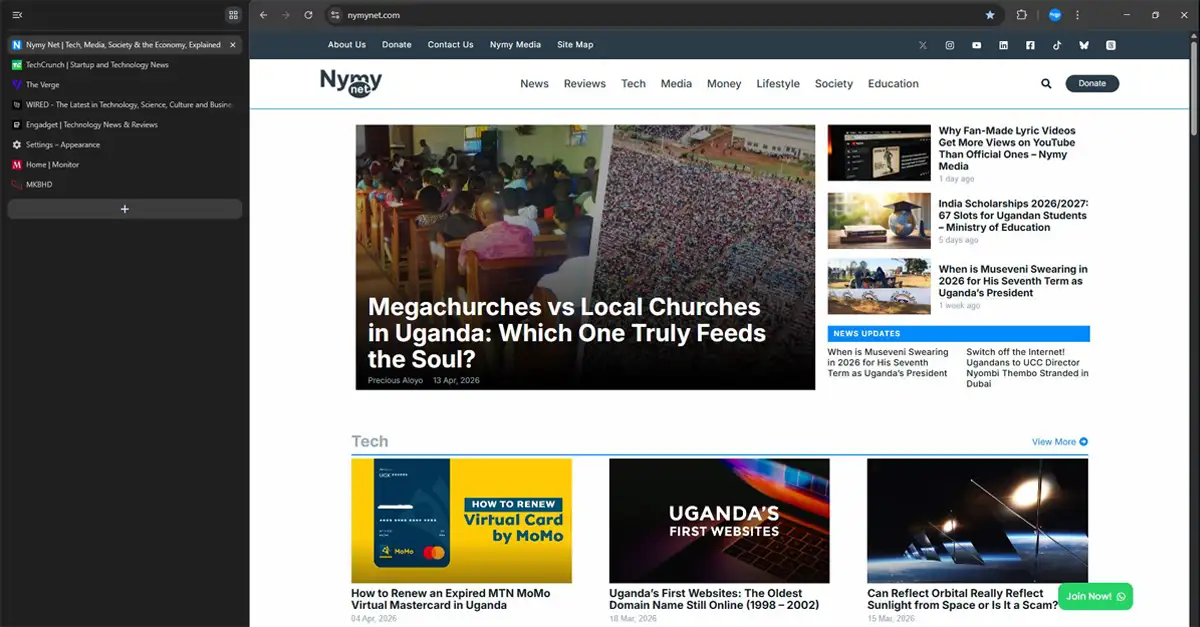
Vertical or Horizontal Tabs, Which One Works Best for You
If you regularly keep many tabs open, vertical tabs are a practical option. Considering the vertical tabs section is adjustable in width, even at its minimum width, it becomes easier to see at least the first part of each page title, while horizontal tabs get too packed and shrink to only the favicon when many tabs are opened.
In that case, vertical tabs can be especially useful when checking multiple pages from the same website, where many tabs may share the same icon but have different page titles. As the list of tabs grows, you simply scroll through the sidebar to move between tabs instead of losing visibility.
Horizontal tabs, in contrast, still work well for people who keep only a few tabs open at once, giving a familiar feel and are a good fit on smaller laptop screens where webpage width matters more.

